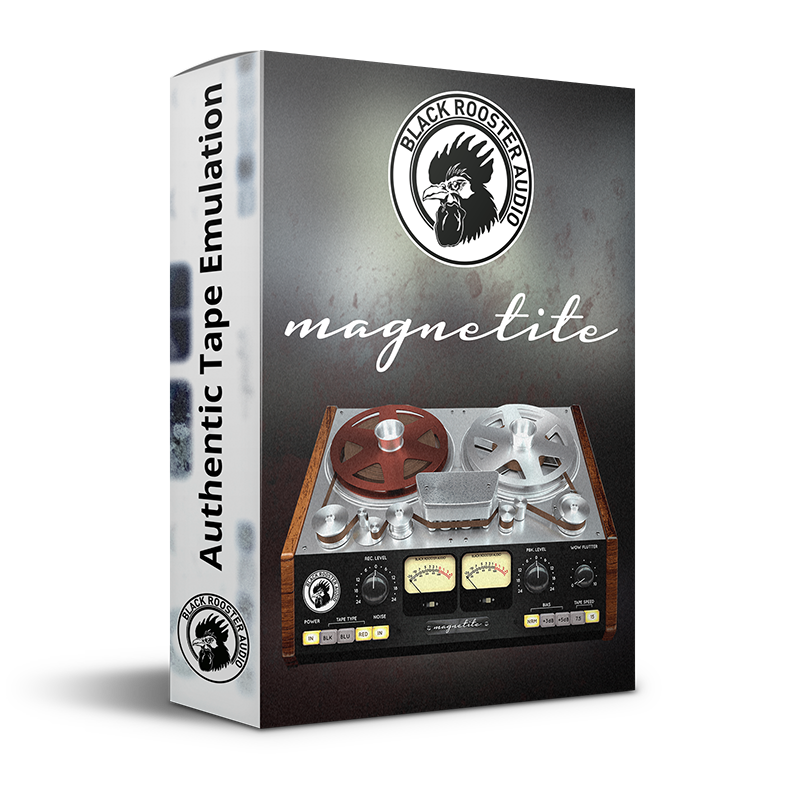
Magnetite
Magnetic Tape Saturation & Warmth
You need to be registered in order to demo our products.
Manual Download
Magnetite ManualSupported formats




Magnetite is available in AAX, VST, VST3 and Audio Units (AU) — compatible with all major DAWs.
Supported platforms (32/64 bit)
Magnetite System Requirements
MINIMUM SYSTEM REQUIREMENTS (MAC)
- Intel Core CPU or Apple SIlicon M+ Processor
- 1GB of RAM
- MacOS 10.13 or newer (M1/M2 supported)
- VST, VST3, AU or AAX compatible host (64bit)
- Display resolution of 1280x1024 pixels or more
MINIMUM SYSTEM REQUIREMENTS (WINDOWS)
- SSE2 compatible processor (Intel Core CPU recommended)
- 1GB of RAM
- Windows 7 or newer
- VST, VST3 or AAX (x64) compatible host
- Display resolution of 1280x1024 pixels or more
About the Magnetite
Inspired by Studer reel-to-reel machines: the open-reel recorders whose Class-A amps, NAB EQ and gentle tape compression are baked into the sound of countless classic records.
Magnetite is a tape saturation plugin — our homage to the sound of magnetic tape recorders. You set the Recording Level, pick a tape type, and Magnetite lays the analog sonics over your track: harmonic warmth, a little compression, that top-end that softens the harshness digital tends to leave behind. Push the input harder for grit and drive; back it off for a clean, subtly-glued tone. It is the kind of processor you stop noticing until you bypass it and the mix suddenly sounds flat.
What tape actually does — and why Studer machines mattered
Recording to tape was never neutral. The magnetic medium saturates as you drive it, rounding transients and adding even and odd harmonics; the Class-A record and playback amplifiers colour the signal; the NAB-style pre- and de-emphasis EQ tilts the frequency response; and the machine's speed and bias settings shape how much low-end bump and high-frequency detail you keep. Studer's open-reel recorders became the studio standard precisely because their version of all that was so musical. Magnetite models the whole chain — Class-A amps, tape response and saturation, NAB EQ, bias, tape speed, plus the hiss, hum, wow and flutter — as a system, so the parts interact the way they do on a real deck instead of sounding like a bolted-on distortion.
Three tape types, two speeds and a bias trade-off
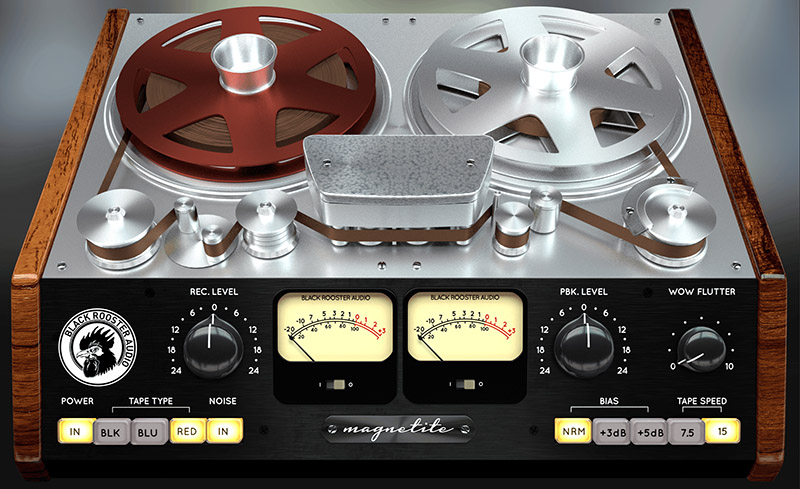
The Tape Type buttons swap between three formulations — Black, Blue and Red — each with its own frequency response, from the low-end head-bump region up through the treble roll-off. There is no "correct" one; you pick the curve your source wants. Tape Speed toggles between 7.5 and 15 ips (that is it — no 30 ips here). 15 ips runs a flatter, more extended response; 7.5 ips shifts the head bump lower and more pronounced and changes how the highs behave. The Bias control (Normal, +3dB, +5dB) trades linearity against saturation character — it is the same inaudible high-frequency signal a real deck feeds the tape to reduce distortion, and pushing it changes how the medium saturates. Recording Level and Playback Level (both -24 to +24dB) set how hard you drive the tape and the Class-A playback amp; right-drag either knob to inverse-link the two, so you can push harmonic distortion without changing the volume — handy for A/B gain-matching.
Using Magnetite on drums, vocals and the mix bus
On drums, drive the Recording Level hard at 7.5 ips for fat, glued room and bus tones — the head bump around 70Hz thickens the kick while the saturation tames spiky transients. On vocals, a gentler setting adds air and a hint of self-levelling that sits a lead in the track without a separate compressor. Across a full mix or stems, run Magnetite as the first insert of the chain — exactly as if the signal were being tracked to tape — for cohesion and analog weight. Want the phasing trick? Duplicate a track, apply Magnetite to the copy and flip its phase, then ride the Wow & Flutter for a lush 70s modulation. And if you are after echo rather than saturation, reach for our tape delay, the TD-201.
Magnetite Features
Three tape types: Black, Blue and Red
Each formulation runs its own multi-stage frequency response — a distinct blend of low-end head bump, midrange emphasis and treble roll-off — so you can pick the tonal curve your source needs before you even touch a level. The response also shifts with the speed setting.
Recording and Playback Level with inverse link
Recording Level (-24 to +24dB) sets how hard you drive the tape; Playback Level runs the Class-A playback amp for subtle coloration at higher settings. Right-drag either knob to inverse-link them and adjust harmonic distortion without changing the perceived volume.
Selectable bias: Normal, +3dB, +5dB
Bias trades linearity against headroom. Higher bias attenuates highs and shifts the saturation character; Normal keeps the most balanced behaviour. It is the same non-audible high-frequency signal a real deck uses to reduce crossover distortion.
7.5 and 15 ips tape speed
15 ips gives a flatter response with less low end; 7.5 ips emphasises the highs and moves the head-bump range lower and more pronounced. Two speeds, two very different flavours of tape character on the same source.
Wow and Flutter with 70s phasing trick
Adds up to 0.5% emulated motor-speed fluctuation and its associated frequency modulation. Turn it fully down to disable, or duplicate your track, apply Magnetite and flip the phase on one copy for a lush 70s phasing effect.
Tape hiss and 60Hz hum
The Noise switch enables or disables the emulation of tape hiss and 60Hz hum, so you can add authentic analog floor noise when you want vintage grit — or keep the noise floor clean when you don't.
Dual VU metering, input and output
Two VU meters monitor level per channel, each switchable between Input (post-record-amp) and Output (post-playback-amp). The meters are calibrated so that 0 VU sits at roughly -14.5dBu, giving you a consistent reference for driving the tape.
Authentic circuit emulation
Our real-time, component-based modelling captures the Class-A amplifiers, tape response, saturation and NAB-style pre- and de-emphasis EQ of the analog counterpart as one interacting system, not a static distortion curve.
SSE2-optimised code
DSP operations are pipelined on the SSE2 instruction set for high-performance operation, even under Magnetite's complex tape and amplifier computations.
Auto-adjusted oversampling
A low-latency, linear-phase Dolph-Chebyshev polyphase design attenuates aliasing and auto-adjusts to your session's sample rate to save CPU while staying transparent.
HighDPI / Retina support
Crisp, high-pixel-density rendering on macOS and Windows for a sharp interface on modern displays.
Magnetite Examples & Videos
Magnetite — Frequently Asked Questions
What hardware is Magnetite based on?
Magnetite is inspired by Studer reel-to-reel tape machines, the open-reel recorders that became a studio standard. It models the whole tape chain — Class-A record and playback amplifiers, tape saturation, NAB-style pre- and de-emphasis EQ, bias, speed, plus hiss, hum, wow and flutter.
What does Magnetite sound like and when should I use it?
It adds warmth, harmonic saturation, gentle compression and analog glue. Use it on drums for fat, tamed transients, on vocals for air and cohesion, and across the mix bus or stems for weight. Drive the input hard for grit, or keep it subtle for clean tape colour.
What do the three tape types do?
Black, Blue and Red each apply a different multi-stage frequency response — their own mix of low-end head bump, midrange and high-frequency roll-off. There is no single "best" one; audition all three on your source. The curve also changes with the 7.5 or 15 ips speed setting.
How do I get more saturation without changing the volume?
Drive the Recording Level harder for more saturation, then right-drag the knob to inverse-link it to the Playback Level. The output compensates automatically, so you can push harmonic distortion up or down while the perceived loudness stays the same — ideal for A/B comparisons.
How do I use Magnetite for a 70s phasing effect?
Duplicate your track, apply Magnetite to the copy and flip its phase, then turn up the Wow & Flutter knob on that copy. The emulated motor-speed fluctuation (up to 0.5%) modulates one signal against the other, producing a lush, moving 70s phasing sound.
Which plugin formats and systems does Magnetite support?
Magnetite ships as AAX, VST, VST3 and Audio Units (AU) for both macOS and Windows, including native Apple Silicon support. It runs in all major DAWs. See the product manual for detailed system requirements.
Is there a free trial of Magnetite?
Yes. Registered users can create a free 14-day trial license from the license manager and demo Magnetite in full before buying. You only need a free Black Rooster Audio account to get started.